BLACK MAMBA

SLOT AUTOMATION

The complete IVAC appointment automation system — auto login, OTP, file upload, mission & centre, date scanning and payment. One extension, one phone app, everything else runs by itself.
No time to run it yourself? Our team books the slot for you — slot booking service, ৳4,000 per file.

Machine-ID bound key 1 month · 1 device Key issued automatically Telegram + WhatsApp support Or let us book it — slot service ৳4,000/file

SOFTWARE LICENSE — PRICING PER DEVICE

1 month license · 1 license = 1 computer. Need more computers? Add devices below. Looking for the slot booking service instead? That is ৳4,000 per file.

★ 1 MONTH PLAN
1 Month
৳5,000 / month · 1 device
License starts the moment you activate it.
  • Full automation — login, OTP, upload, mission, centre, dates, payment
  • Primary + 3 co-applicant PDF slots (up to 4 files)
  • Smart date scanning with forward / backward rotation
  • Time-slot alert sound when a slot is found
  • Free updates while your license is active
  • Telegram + WhatsApp support
🔑 Order now — get my key
Payment via bKash or Nagad, then paste your TrxID. Key appears on the same page.

How many devices?

Every computer/laptop needs its own Machine ID and its own license slot.
1
devices / computers
1 device × ৳5,000৳5,000
Total for 1 month৳5,000
Extra device price: ৳3,000 each · max 5 devices per order. More than that? Message us on WhatsApp or Telegram.
Continue to payment →

TWO SERVICES

Run the automation yourself — or hand the whole booking to our team.

★ SOFTWARE LICENSE
Black Mamba Extension
৳5,000 / month · 1 device
You run everything on your own computer — login, OTP, upload, mission, centre, dates and payment.
  • 1 month license, Machine-ID bound
  • 1 license = 1 computer (extra device +৳3,000)
  • Key issued automatically after payment approval
  • Free updates while the license is active
🔑 Buy the license
Want the whole booking done for you? Use the slot booking service below.
★ SLOT BOOKING SERVICE
IVAC Slot Booking
৳4,000 / file
Our team books the appointment for you — no software, no rush, no OTP struggle.
  • Primary + up to 3 co-applicants in one order
  • Documents uploaded, checked and placed in the right slots
  • IVAC account password encrypted — never shown in plain text
  • Release-day booking done by our team
  • OTP asked only on the booking day, on the channel you chose
  • Live progress, timeline and confirmation in your dashboard
🪪 See the slot booking service
No extension needed for this service — any phone with an IVAC account works.

SEE IT IN ACTION

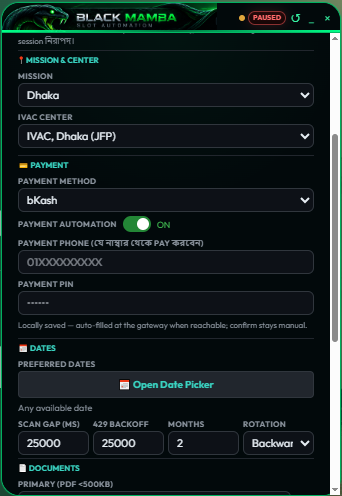
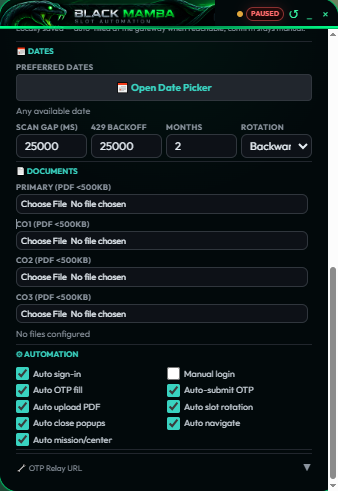
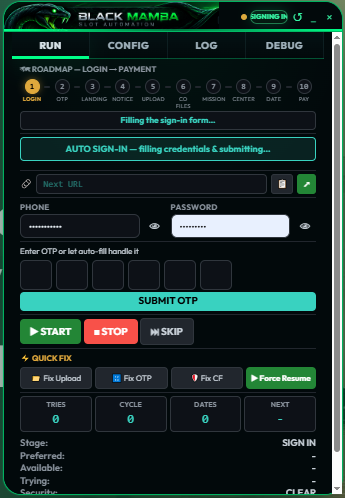
Real screens from the extension. Click any screen to see it full size.

Extension screenshot

EVERYTHING AUTOMATED

One click on START — the engine handles every step of the IVAC flow.

🔐

Auto login + OTP

Signs in with your number & password, and the OTP from your phone's SMS is filled in and submitted automatically by the OTP Reader app.

📄

Auto file upload

Uploads Primary + up to 3 co-applicant PDFs one by one, verifies each against the site, and never marks a file uploaded unless the server confirmed it.

🎯

Mission & centre

Picks your mission and IVAC centre from the config and verifies them on the real page.

📅

Smart date scan

Cycles dates with your chosen gap, forward or backward, and keeps retrying until a slot opens.

🔔

Slot alert

Instant sound + on-screen alert the moment a bookable slot or the payment page appears.

🧾

Document identity check

Reads each PDF and shows name, passport, visa type and application ID — so the wrong file never gets uploaded.

HOW IT WORKS

From payment to a working key — usually under a few minutes.

01

Order & pay

Choose your devices and place the order — your order page then shows the bKash/Nagad number and the exact amount.

02

Download & get your ID

Your order page unlocks the package (extension + APK) and the setup video. Install it, then copy your Machine ID from the extension.

03

Paste the ID → key

Paste the Machine ID on your order page. The signed key appears instantly — put it in CONFIG → License → ACTIVATE and press START.

SETUP VIDEO GUIDE

Watch once and you can set the whole thing up alone.

Full setup video

Install the extension, copy your Machine ID, paste the license key, set up the OTP app — step by step.

Watch the guide →

01Download the ZIP and unzip it
02Load the extension → copy your Machine ID
03Activate your license key
04Install the OTP APK on the phone
05CONFIG → files, mission, centre, dates
06Press START and wait for the slot

FREQUENTLY ASKED

Where do I find my Machine ID? +
Install the extension → open the panel → CONFIG tab → License section → press the 📋 copy button. That ID belongs to that one computer.
Can I use one key on two computers? +
No — for two computers you need 2 devices in your order (৳5,000 + ৳3,000). A single-device key shows WRONG MACHINE on any other computer. This is exactly why a key cannot be shared or resold.
Where do I send the money? +
Place your order first — the page then shows the bKash/Nagad number and the exact amount for your device count. Always check the amount on that page before sending.
How does the OTP work? +
Install the OTP Reader APK on the phone that receives IVAC SMS. It reads the OTP and sends it to your extension automatically — you don't type anything.
How long does approval take? +
Usually a few minutes. Keep the order page open — the key appears by itself as soon as the payment is verified.
What happens when the month ends? +
The key stops working and the engine stops too. Buy a new month and paste the fresh key — nothing else to reinstall.
Does the site update break it? +
We follow IVAC changes and ship updated builds to active customers. New builds are announced in the Telegram group.
NEED HELP? MESSAGE US

Telegram or WhatsApp — we help with setup, payment and anything else.